
Hitachi embraces iPad control with projector App
Published: PRODUCTS
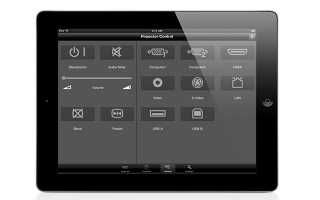
Hitachi has embraced the iPad control platform with the Projector Quick Connection iPad App, a tool that enables users to monitor and control multiple 3LCD projectors from a single iPad.
Acknowledging that iPads are now becoming more commonplace in houses of worship, Hitachi designed the free App in order to provide users with a more flexible control option.
The tool is comprised of four pages: projector, contents, control and settings. Starting with the projector page, this brings up an icon for every Hitachi projector connected to the iPad, with each projector’s IP address listed with the corresponding icon. A user can connect to any of them at any time by clicking the corresponding icon, although the manufacturer notes that projectors must be equipped with a USB wireless adaptor to connect to an iPad.
Meanwhile, the Contents page allows a user to display content from their iPad onto their selected Hitachi projector, including documents, pictures and web pages. Moving on to the Control page, this provides access to control functions, including standby/on, audio mute, blank and freeze. The input source selection area allows a user to choose from two computer ports, two USB ports, HDMI, Video, S-Video and LAN.
Lastly, the Settings page provides access to advanced functions, including Presenter Mode, which enables the user to prevent a projector from connecting to another iPad. It also allows the user to select the display mode, where they can chose between either ‘Full Image’ mode or ‘4 iPad’ mode (which can display content from up to four iPads on the same image).
Shipping: Now
Web: www.hitachi.com