
How to set-up gain structure (part one)
Published: WORSHIP
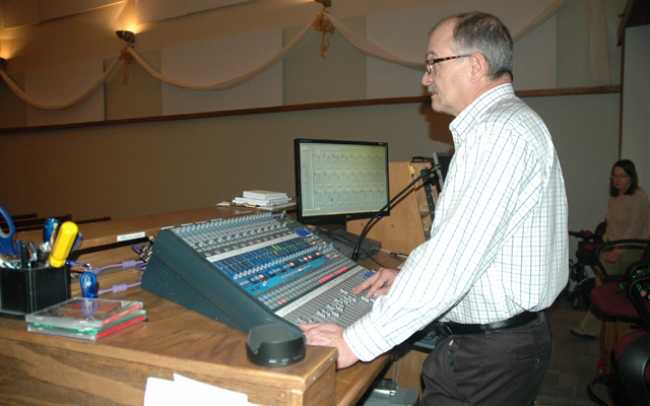
Properly setting up gain structure is critical to achieving high quality audio. Live sound expert Gordon Moore explains how to get the best results with the unity gain technique...
At my own church we host many community events. Often, after hearing our system, visitors request that I help them get their own system into good order.
The most common problem is audio gain structure. In many cases there is either a horrible hiss or noise that is easily audible or there is distortion. Sometimes, both problems can be heard.
Setting gain structure involves optimising the various audio circuits in a system to provide the best signal-to-noise ratio while preventing clipping in the signal chain. Poor signal-to-noise is characterised by hiss and noise that is audible to the congregation. Clipping causes distortion and even equipment damage – it can shorten the life of your gear considerably. Both problems reduce intelligibility and that is the greatest problem of all. The purpose of a sound system in a house of worship, regardless of the denomination, is to carry a very important message to those in attendance. Vocal intelligibility is key for this to occur.
The good news is that setting up proper gain structure is really quite easy and does not require an arsenal of high-tech equipment. Gear as simple as a Digital Multi Meter (DMM) or even a small, inexpensive piezo speaker can do the job.
But first, here’s some theory to get you started.
The most common error in setting up gain structure is the assumption that the amplifier with the most gain is the one that drives the loudspeaker – that big fat amplifier sitting in the rack. In fact, it is not.
Take a close look at your mixing console. Regardless of the brand or whether it is analogue or digital, right at the top of the channel strip (or at the beginning of the software interface), there will be a knob/control marked Gain or Trim. This is the preamp for the microphone inputs and it is the most powerful control on your console. Get this right and your sound system will be easy to set-up and operate. Get it wrong and you will struggle constantly. The preamp provides anywhere from 60 to 80+ decibels of amplification to your signal. How well you set this control up establishes your signal-to-noise ratio.
Let’s take a closer look at that last statement. Imagine you have a dynamic choir microphone which is developing a signal of about -60dBu when the choir is singing. Now, if you set the input gain for +20db of gain, the mic signal will only increase to -40dBu. The preamp itself has its own noise, measured at -80dBu. We have noise at -80dBu and the desired signal at -40dBU. Subtract the noise from the desired signal and we end up with a signal-to-noise (S/N) ratio of 40dB. With each successive step where the gain is raised again (via signal processors and amplifiers) the noise floor is also amplified along with the desired signal. In addition, each device along the way adds its own noise. So, by the time the signal hits the loudspeakers, the S/N ratio has actually degraded to 34 to 37dB – a very poor number and very hissy. (See Signal to noise ratio diagram one.)
Now let’s take the very same microphone and raise that input trim to 55dB. Now the desired signal is at -5dBu and the noise is still at -80dBu. The self-noise of the preamp (on a properly designed circuit) does not rise much as you increase the gain. With a simple twist of the knob, we have improved our S/N ratio to 75dB. Notice how our final signal to noise ratio is very close to 70dB – nice and quiet. (See Signal to noise ratio diagram two.)
But as with anything beneficial, you can have too much of a good thing. Too much gain on the input trim means you will have clipping. This is the result of the preamp (or any audio circuit) attempting to drive the signal to a higher voltage than the circuit can provide. The resulting signal on an O-scope looks like the top has been ‘clipped’ off with a pair of scissors. There is energy in that signal that must go somewhere. In a preamp, that energy appears as harmonics of the original signal which adds distortion to the audible signal. Even worse, that excess energy in the loudspeaker is converted directly to heat – shortening or even terminating the life of the speaker.
The goal in setting the preamp gain is simple – get as much level as possible without allowing any clipping.
Headroom
There is one other concept that is very important for gain structure – headroom. This is the amount of increased signal you wish to have in your system above the normal operating level. Typically, in a church/concert style system, 20dB of headroom is a good start.
First, find the audio product in your signal chain with the lowest maximum output level. Look at the specifications of each item in the chain and ask yourself what the maximum output level is for each unit? Then list them in descending order. For example, you might have a console with a maximum output of +28dBu, an equaliser with a maximum output of +20dBu, and compressors with a maximum of +24dBu.
In this scenario the equaliser has the lowest maximum level of +20dBu. If you wish to have 20dB of headroom, you will be setting up your system so everything is delivering signal at approximately 0dBu. If everything was capable of +28dBu, then your nominal level could be 8dB higher at +8dBu. This is of course very basic arithmetic: 28 minus 20 equals eight.
Putting theory into practice
Now that we’ve looked at the theory behind gain structure, it’s time to put those ideas into practice.
There are two well founded methods for setting up gain structure. One is called unity gain and the other is system optimisation. Both have their relative benefits and we will discuss both. In this issue of Worship AVL Asia, we will concentrate on a step-by-step guide to the unity gain method. In the next issue, we’ll cover how to set up a system using system optimisation. Both methods are good and either can work well for you.
The advantage of a unity gain system lies in its simplicity. You will select a normal operating level and all units on the system will be set up for that level with a simple test tone. That normal operating level will be based on the nominal level established in our earlier discussion about headroom. In the case of the system where the maximum output was +20dBu and you want 20dB of headroom, the unity gain level will be 0dBu. (That level of 0dBu equals .775V AC on a Digital Multi Meter.)
Before we begin, here are the tools that you will require to complete each of the steps that follow: a simple sound meter, a signal generator and a Digital Multi Meter (DMM). You can download a wide range of signal generators for your laptop, buy dedicated signal generators or even get an application for your smartphone. You will require two signals – pink noise and a test tone (440Hz – the A note) and/or a 1Khz tone.
Step one
Turn off your amplifiers – you do not need to have the amplifiers switched on for setting gain until the time comes to set up the level in the room. If you can hear your signals while you are conducting the following procedure then you might get feedback or hear other things – the amplifiers will mislead you.
Step two
Zero out your mixing console. Set all of your faders to the U or 0 mark on the channel strip. If your channel strip starts with 0 at the top of the fader strip, set it 10dB down from the top of the strip. Set the output channels to the same mark.
Step three
Feed a test signal into one of the inputs on the console. If your console has a meter capability, set the input trim on the channel so that you are getting the unity gain level (in this case 0dBu) on the channel meter. All meters on the board should register 0dBu at this point. Keep your signal running at this point. Set your DMM for measuring AC and connect to pins 2 and 3 (or the tip and ring of a TRS connector) and measure the level. The level should measure .775V AC.
Step four
Set the levels on the next audio device in the chain. Set the input trim at 0dB gain. Attach your DMM to the output of the unit and adjust the output level so that it reads – again – .775V. Now repeat this step four for every audio unit in the signal chain until you get to the amplifier.
Step five
It’s time to deal with the amplifiers but do not turn on your amps yet. First, set your test signal to pink noise and then turn the amplifier levels all the way down. Now turn on your amplifiers. Turn up the levels until you read the target sound pressure level you need for the system.
What should the target level be? That is a choice based on the worship style and the ambient level of the room. In my church, with a half-full sanctuary, the sound level (without amplifiers) is approximately 55dB. For good intelligibility, you want a 15dB to 20dB advantage over the room level, so in our case we target 75dB for the liturgical service.
For our praise service, which has a more contemporary style including a band and a rowdier congregation, the target level is 84dB with a maximum of 93dB. (Over 100dB is too loud for most people and tends to desensitise listeners’ ears – more of which in a later article.) Always remember that louder does not equal better!
Step six
Run a sound check. For each input, adjust the input gain knob at the top of the channel strip until you have that source at the level you need for a pleasing mix. Don’t be tempted to touch the faders – keep them at 0dB. Ideally you should set your input trims so that the meter bounces near or just below 0 at normal singing/playing levels. Crucially, make sure they don’t distort (clip) when they hit big notes at the maximum level.
Now, your system is set up for unity gain, your amps are at their optimal levels and you can adjust the mix at the faders (which do not negatively affect the S/N ratio). At this stage you can mix as usual and your system should be quieter and more stable.
Don’t be nervous if your amps are only a third or half way on – they are operating at nominal levels and will be fine. It is also okay if your input trim knobs vary a lot – each source requires something different. The goal is superb listening – not neat and orderly knobs all lined up in a row.
As is always the case with any new skill, the best way to master the unity gain technique is to practice it. Once you feel comfortable following these simple steps you will be ready to learn about the second method of setting up gain structure, which we will look at in-depth in the next issue of Worship AVL Asia as we present a step-by-step guide to system optimisation.
Meet the author
Audio expert and industry veteran Gordon Moore is the director of technical ministries at Rio Rancho United Methodist Church in Rio Rancho, New Mexico; vice president of sales for Lectrosonics Inc; senior faculty member for the InfoComm Academy; and was named Educator of the Year for InfoComm in 2000.